
Fortnite Cheat Setup: Requirements, First Launch and Common Problems
Setup is where most first-time buyers get stuck. Here is a straightforward walkthrough from checking status to first launch, plus fixes for common problems.
Most setup problems come from skipping a step, not from the product itself. This walkthrough covers the order that tends to work and what to try when something goes wrong. Always follow the specific guide that comes with your product, since details differ.
Before you buy
Check that the product is online. Fortnite patches often, and a product that is offline after an update cannot be used until it is updated. Then check the system requirements. The product pages in our store list Windows 10 or 11, 64-bit, and an Intel or AMD CPU, and ask you to run the loader as Administrator. Read the requirements on the exact product you plan to buy.
After purchase
Once payment clears, your portal unlocks the loader and the setup guide. Read the guide before you launch anything. It is short, and it covers the details that are specific to that product.
First launch
- Close Fortnite and the Epic Games launcher
- Run the loader as Administrator
- Follow the guide for the order of launching the loader and the game
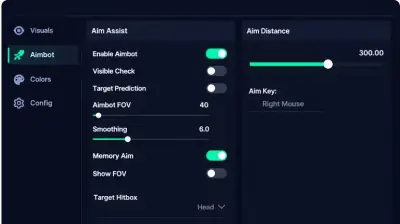
- Start with a conservative preset instead of maxed out settings
- Test in a low stakes mode before using it anywhere that matters
A conservative preset keeps your play believable and makes it easier to see which setting causes a problem, if one does.
Common problems
The loader will not open. Confirm you are on 64-bit Windows 10 or 11 and that you ran it as Administrator.
It worked yesterday and now it does not. Fortnite likely updated. Check the status page and wait for the product to be updated. Updates are included during your license.
Crashes after launching. Check the status first, then follow the guide to see whether any Windows settings need to be adjusted. Some tools ask for specific virtualization or security settings, and the guide is the source of truth for those.
It conflicts with another tool. If you use a spoofer alongside a cheat, read the requirements for both. Our HWID spoofer listing says Cloud DMA is required for full functionality, so make sure you understand that before you combine tools.
You changed PCs. The product pages say you can use HWID reset in your portal or open a support ticket.
When to contact support
If you have followed the guide and still have a problem, open a ticket or use Discord. Include your Windows version, what you did and any error text. Clear details get faster answers.
Know the risk
Using cheats breaks Fortnite's rules and can lead to bans. A conservative setup and an account you can afford to lose are your best protection. No setup guide can promise otherwise.
Next step
If you are still choosing a product, our buyer's guide walks through what to compare. If you are ready, check the Fortnite hacks page for current plans and status, and consider whether an HWID spoofer fits your setup.